

Description
Download Thycotic PAM – Enterprise Password Management
Overview
The Thycotic PAM desktop application is a specialized tool designed for IT professionals and enterprise teams that rely on Thycotic Secret Server for privileged account management. It enables secure, on-the-go access to an organization’s centralized password vault from a desktop environment. By bridging the gap between remote work and secure credential handling, the app supports critical workflows such as server maintenance, client site visits, and emergency access scenarios. It is not intended for individual consumers but rather for organizations requiring centralized control over sensitive credentials.
Users gain the ability to search, view, edit, and create secrets directly from their desktop, maintaining organizational structure and security compliance. The application operates under strict access policies defined by Secret Server administrators, ensuring that only authorized personnel can interact with sensitive data. It is particularly useful for IT teams managing privileged accounts across hybrid environments, as well as non-IT departments like finance or marketing that require secure sharing of login credentials.
The developer, Thycotic, is a recognized provider of enterprise security solutions, trusted by over 3,000 organizations globally, including Fortune 500 companies and government agencies. The app integrates seamlessly with existing Secret Server deployments, making it a natural extension of an organization’s existing security infrastructure.
Key Features & Capabilities
- Centralized Access to Secret Server – Provides full visibility and control over organizational secrets from the desktop, eliminating the need to switch between browsers and servers.
- Secure Search and Organization – Enables users to quickly locate secrets and folders, with support for hierarchical folder structures and customizable templates.
- Favorite Management – Allows users to bookmark frequently accessed secrets for faster retrieval, improving workflow efficiency during high-pressure situations.
- Access Request Workflow – Facilitates secure, auditable requests for access to restricted secrets, aligning with enterprise compliance standards.
- Offline Caching (Conditional) – If enabled by the administrator, users can cache secrets or folders locally for offline use, supporting work in disconnected environments.
- Local Encryption and PIN Protection – Adds an extra layer of security by requiring a personal PIN to unlock the app, with AES 256-bit encryption applied on both server and desktop.
- Integrated Password Generator – Creates strong, unique passwords automatically, reducing the risk of weak or reused credentials.
- Audit-Ready Actions – All user interactions within the app are logged and traceable, supporting compliance with internal and external security audits.
These features collectively support secure, efficient credential management across distributed teams. Real-world use cases include emergency server access from a remote location, securing marketing team logins for digital campaigns, and managing access to physical security systems such as combination locks or access doors.
User Interface, Workflow & Performance
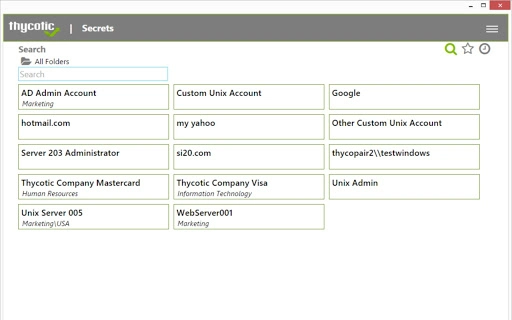
The user interface of Thycotic PAM is designed with functionality and security in mind, offering a clean, minimal layout focused on efficient navigation. The main dashboard displays folders and secrets in a tree-like structure, allowing users to expand and collapse sections for easy browsing. Navigation is intuitive, with contextual menus and quick-access buttons for common actions like searching, creating new secrets, and managing favorites.
Workflow efficiency is enhanced by features such as keyboard shortcuts, instant search, and the ability to pin frequently used secrets. The application maintains a consistent experience across both Windows and Mac platforms, with no noticeable delays during standard operations. However, exact performance details were not specified by the developer.
Stability appears to be well-managed, given the application’s integration with a mature enterprise platform. Resource usage behavior, including CPU and RAM consumption, was not disclosed. The developer did not specify resource usage details. General software behavior patterns suggest the app operates efficiently without significant system overhead.
Compatibility & System Requirements
Thycotic PAM is compatible with both Windows and Mac operating systems, supporting a broad range of enterprise environments. The application is designed for desktop use and requires a valid Thycotic Secret Server account for activation. It has a file size of 15.8 MB, indicating a lightweight installation.
Exact system requirements were not listed. The developer did not provide additional system requirements. Installation is straightforward, though the app must be enabled by a Secret Server administrator before use. Compatibility with specific Windows or Mac versions is not specified, but given the platform support, it is likely compatible with current and recent OS releases.
Pros and Cons
Pros
- Seamless integration with Thycotic Secret Server for centralized credential management
- Strong security with AES 256-bit encryption and local PIN protection
- Supports offline access when caching is enabled by administrators
- Intuitive interface designed for enterprise efficiency
- Facilitates secure team password sharing and access control
- Free to download and use for eligible organizations
- Compliant with audit and regulatory standards
Cons
- Requires a paid Thycotic Secret Server account to function
- Not available for standalone or personal use
- Offline functionality depends on administrator configuration
- No public user reviews or performance benchmarks available
- Platform compatibility details are limited
FAQ Section
Is Thycotic PAM available for free?
Yes, the Thycotic PAM desktop application is available at no cost. However, it requires a valid Thycotic Secret Server account, which is a paid enterprise solution.
Can I use Thycotic PAM without a Secret Server account?
No. The application is designed to work exclusively with an existing Thycotic Secret Server deployment. It cannot function independently or with other password managers.
Is the app secure for enterprise use?
Yes, the app uses AES 256-bit encryption for data at rest and in transit. It also requires a personal PIN for local access, adding an additional security layer. All actions are audited and traceable.
Does the app support offline use?
Offline access is possible only if mobile caching is enabled by your organization’s Secret Server administrator. This feature allows cached secrets to be accessed without an internet connection.
How often does the app receive updates?
Updates are managed through the Thycotic Secret Server platform. The application automatically receives updates as part of the enterprise system’s maintenance cycle, ensuring ongoing security and compatibility.
Final Thoughts + CTA
Thycotic PAM delivers a focused, secure solution for enterprise teams managing privileged accounts. Its seamless integration with Secret Server, robust encryption, and compliance-ready features make it a strong choice for IT professionals and security-conscious organizations. While it is not suitable for individual users or standalone use, it excels in environments where centralized access control and auditability are critical.
For businesses already invested in Thycotic’s ecosystem, this desktop utility enhances productivity and security without adding complexity. Its lightweight design and intuitive interface further support efficient daily operations.
Download Thycotic PAM now to bring secure, reliable access to your organization’s secrets—anytime, anywhere.
Guides & Tutorials for Thycotic PAM App for Chrome
How to install Thycotic PAM App for Chrome
- Click the Preview / Download button above.
- Once redirected, accept the terms and click Install.
- Wait for the Thycotic PAM App for Chrome download to finish on your device.
How to use Thycotic PAM App for Chrome
This software is primarily used for its core features described above. Open the app after installation to explore its capabilities.
User Reviews for Thycotic PAM App for Chrome 0
No reviews found





